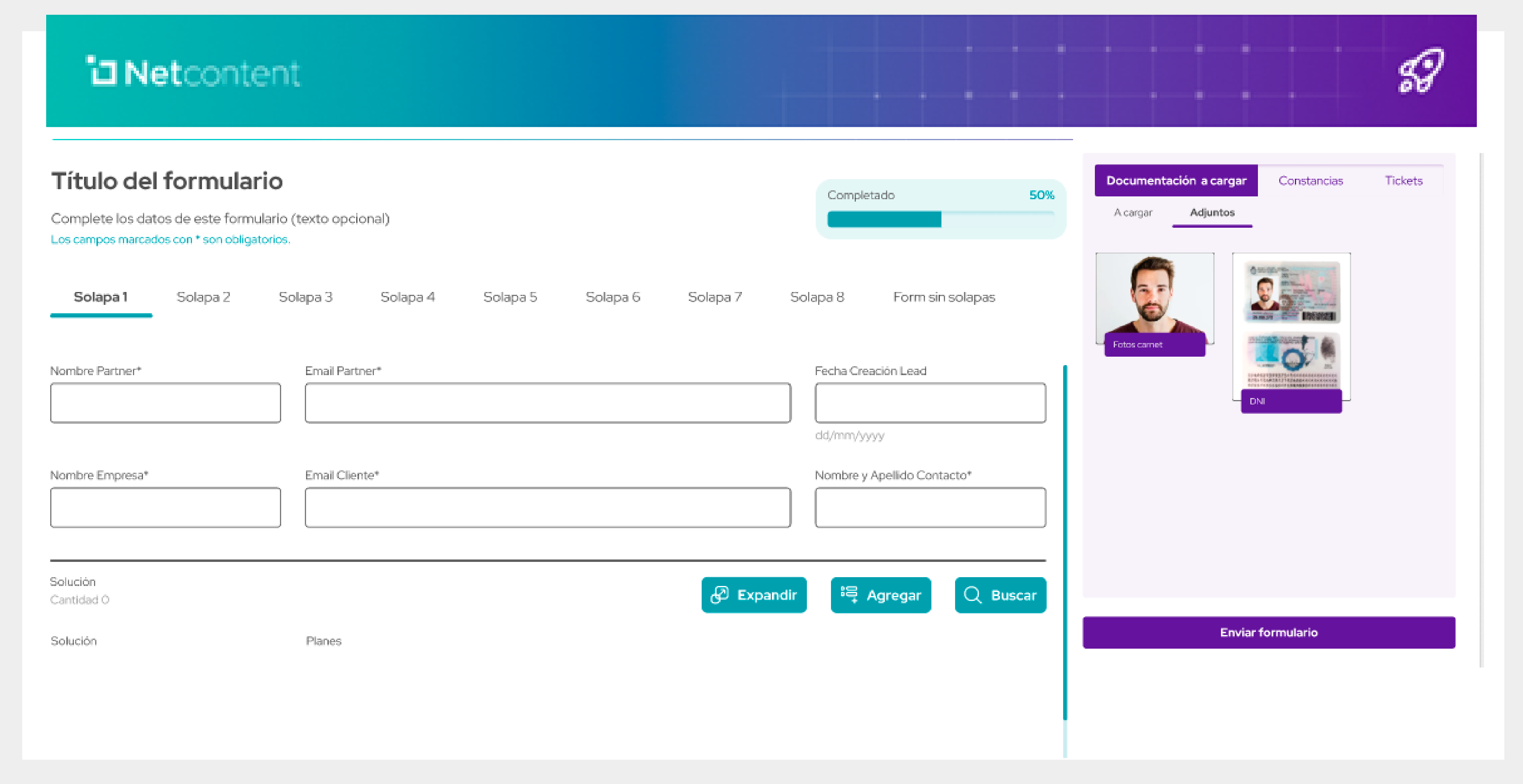

New UX Forms
New functional capabilities:
1. Smart stage-by-stage navigation
The form now includes a dynamic progress bar with automatic advancement.
- Visually shows how much is left to complete
- Improves user orientation
- Makes it easier to track progress throughout the process
2. Optimized step pagination
The new step-based pagination allows users to:
- Split the form into clearer sections
- Move forward or backward without losing data
- Reduce visual load and improve usability
3. Enhanced selection experience
- Faster search
- Cleaner, more streamlined display
- Tags that integrate seamlessly with the overall form design
4. Easier, more intuitive document upload
- Upload files via drag & drop
- Switch between tabs (To Upload / Attachments)
- Quickly see which documents are still missing
5. Quick access to key sections
The right-side panel allows users to:
- Access attachments.
- Upload files from any step in the process
6. Submit button with automatic validation
The “Submit Form” button:
- Checks that required fields are completed
- Ensures documents have been uploaded
- Prevents errors before final submission
7. Cleaner, more intuitive data entry experience
Form fields have been reorganized to deliver:
- Better readability
- Less friction when entering information
- A user experience closer to a modern digital onboarding flow